Dynamic Volume Control
Music automatically ducks during important gameplay moments, then smoothly returns when the danger is over.
ZoneSync automatically ducks Spotify, Discord and other apps during crucial competitive moments — walks, clutches, buy rounds — and restores them right after.
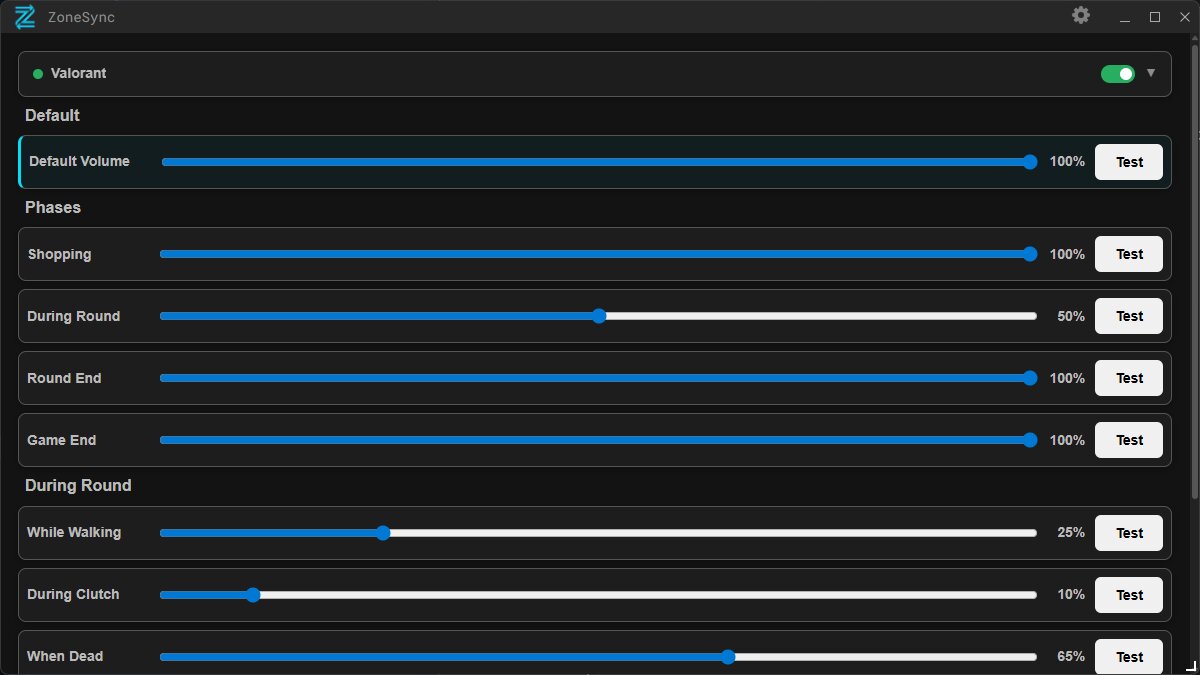
Every mode uses the same core logic, tuned to a different game event.
Music automatically ducks during important gameplay moments, then smoothly returns when the danger is over.
Volume lowers whenever you hold your Walk key (e.g. Shift), so you can actually hear what's around you.
Volume drops automatically when you're the last player alive — full focus for your 1vX situations.
Full volume comes back the moment you die. Spectate your teammates without touching the pause button.
Separate volume levels for active combat versus shopping time, detected automatically each round.
Choose exactly which apps get controlled — mute Spotify while Discord stays at normal volume.
ZoneSync works with competitive games. More titles are on the way.
CS2 — full walking, clutch, death and buy-round detection.
More titles coming soon.
ZoneSync uses the Overwolf Game Events Provider to detect game states locally on your machine.
Get ZoneSync from the Overwolf Store.
The app detects the game automatically.
Set your preferred volume levels for each game state.
ZoneSync runs quietly in the background.
ZoneSync will be available for download on the Overwolf App Store. Questions or feedback? We'd love to hear from you.
Discord Comunity